Cannabis Batch Tracking: From Spreadsheets to AI Analysis
You track batches because the state requires it. Every commercial cannabis grower does. Metrc gets its plant counts, harvest weights, and chain of custody documentation. The state is happy. You move on to the next run.
But here’s the thing: compliance tracking tells the state where your plants are. It tells you absolutely nothing about how to grow better. The grower who treats cannabis batch tracking as a performance system (comparing run over run, scoring outcomes, identifying what actually changed) is the grower whose cost per pound drops every quarter. Everyone else just repeats the same run and hopes the numbers come out different.
Cannabis Batch Tracking Methods Compared
| Method | What It Tracks | Analysis Capability | Effort Level | Cost | Best For |
|---|---|---|---|---|---|
| Paper logs / whiteboards | Basic notes (strain, dates, visual observations) | None (review from memory) | High (manual entry, hard to search) | Free | Very small grows, hobbyists |
| Spreadsheets (Excel, Google Sheets) | Environment data, yields, notes (whatever you type in) | Manual (pivot tables, charts if you build them) | Medium (data entry + formula maintenance) | Free | 1-2 room operations, getting started |
| Seed-to-sale / METRC | Plant counts, transfers, harvest weights, destruction, test results | Compliance reporting only (not designed for cultivation improvement) | Medium (required by law) | Varies by state | Legally required in regulated states |
| Sensor dashboards (standalone) | Temperature, humidity, VPD, sometimes substrate data | Historical charts, threshold alerts | Low (automatic collection) | $50-500/mo + hardware | Operations focused on environment monitoring |
| Sensor + hardware platforms (AROYA) | Environment + irrigation + substrate (VWC, EC) | Equipment control, irrigation automation | Low-Medium (hardware dependent) | $$$$ (proprietary hardware + subscription) | Large operations with hardware budget |
| AI cultivation intelligence (Growgoyle) | Yield, environment, photos, lab results, grower notes, batch history | AI batch analysis after every run, photo-based plant health, batch comparison, daily AI guidance | Low (photo upload + data entry, sensors via CSV/API) | $499-999/mo | Mid-market commercial grows (3-50 employees) |
The real question is not which method to pick. Most commercial operations end up using compliance tracking because they have to, and then need something else for actual cultivation improvement. The jump from spreadsheets to structured batch tracking is where the compounding starts: when you can compare Run 3 to Run 1 and see exactly what changed, every future batch gets smarter.
See What AI Batch Analysis Looks Like
Upload a photo of your canopy and get an AI plant health assessment in 60 seconds. Or see a full AI batch analysis from a real commercial run. Growgoyle doesn’t track your costs. It helps you lower them by making every batch better than the last.
Compliance Tracking vs. Performance Tracking in Cannabis
Let’s be clear about what Metrc actually requires. Plant counts. Room assignments. Harvest weights. Chain of custody from seed to sale. It’s inventory management for regulators. Important? Yes. Useful for improving your cannabis cultivation? Not even a little.
The compliance mindset says: “Tracking is something I do because I have to.” You fill in the required fields, you generate the reports, you pass your audit. Done.
The performance mindset says: “Tracking is how I make every cannabis run better than the last.” You capture everything that matters to growing quality flower at lower cost. You review it after every harvest. You compare it across runs. The data becomes the engine for continuous improvement.
Most cannabis operations live entirely in the compliance mindset. They have mountains of Metrc data and zero idea why Room 3 pulled 2.4 lb/light last run when Room 1 hit 3.1 with the same genetics.
What a Performance Batch Record Actually Looks Like
A real cannabis production record goes well beyond what compliance requires. Here’s the minimum viable batch record for a commercial flower operation:
- Strain, clone date, flip date, chop date, dry weight (the basic timeline)
- Lights and canopy square footage (so you can calculate real yield metrics)
- Plant count (density matters more than most growers think)
- Environment summary (any VPD swings, temperature deviations, humidity spikes?)
- Nutrition changes (anything different from the last run?)
- Pest and disease events (what happened, when, what you did about it)
- Lab results (THC, terpenes, microbials, water activity)
- Final yield metrics: lb/light, g/sqft, g/watt
- Notes: what went well, what you’d change next time
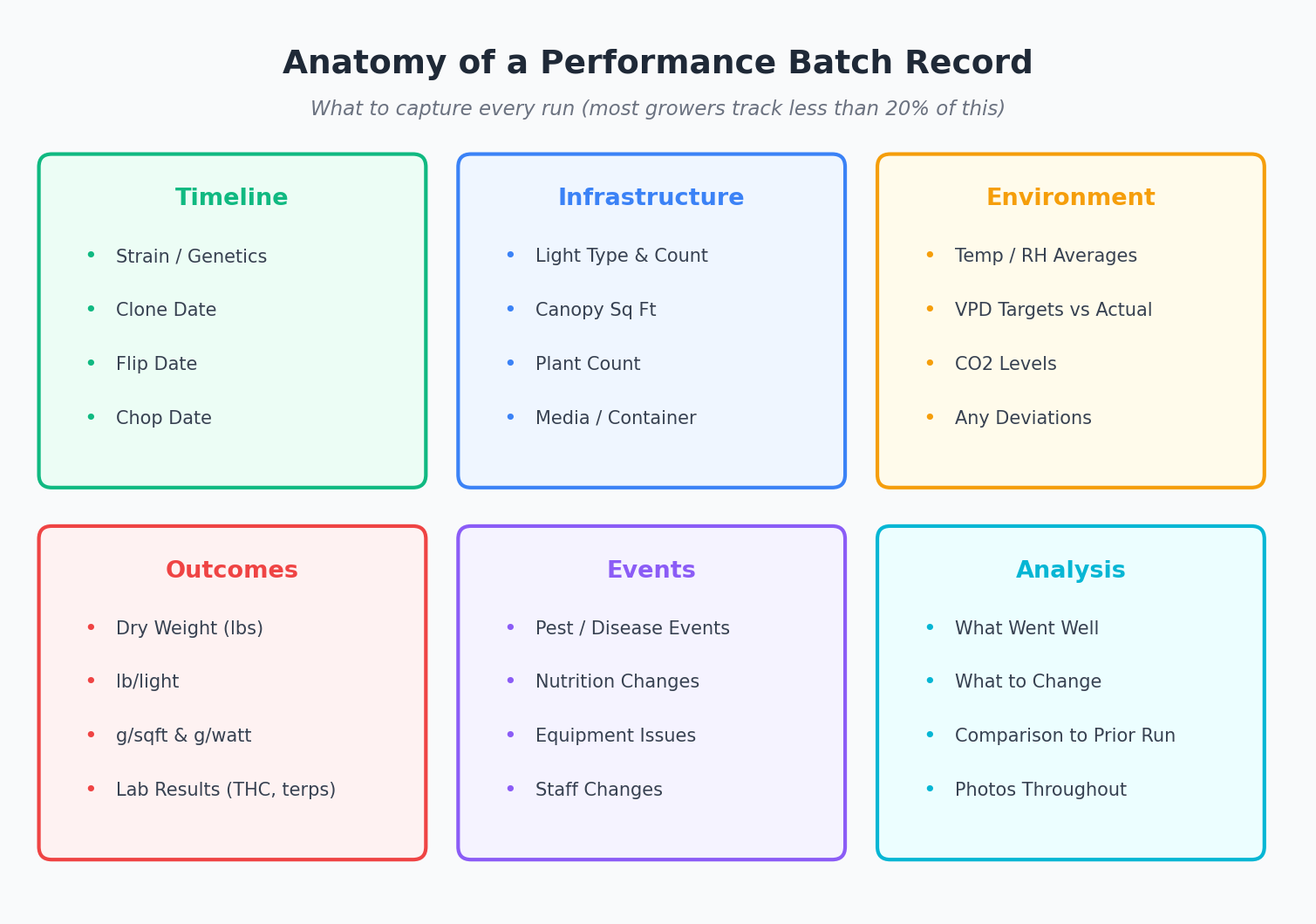
A complete performance batch record captures far more than compliance requires.
Most growers capture maybe 20% of this. The rest lives in their head. And it disappears the moment the next run starts and the day-to-day takes over. Three months later, when you’re trying to figure out why the same strain in the same room is yielding 15% less, the answer is gone. It walked out the door with the last run’s memory.
What a Complete Batch Record Includes
Pre-Run
- Strain and genetics source
- Clone/seed date
- Target plant count
- Room assignment
- Light configuration
- Growing medium
Vegetative Phase
- Transplant dates
- Topping/training dates
- Environment averages (temp, RH, VPD)
- Feed recipe and EC targets
- Photo documentation
Flower Phase
- Flip date
- Stretch measurements
- Weekly photo documentation
- Environment data by week
- Feed adjustments and EC/pH runoff
- Defoliation dates and method
- Pest/disease observations
- Any interventions (foliar sprays, beneficial insects)
Harvest
- Wet weight
- Dry weight
- Yield per light (or per plant/sqft)
- Trim weight
- Waste weight
- Hang dry conditions and duration
Post-Harvest
- Lab results (THC, terpenes, moisture)
- Final yield calculations
- Cost inputs for the run
- AI analysis results
- Comparison notes vs. previous runs
The Power of Cannabis Batch Comparison
One batch record is a snapshot. Two is a comparison. Five is a trend. This is where cannabis harvest tracking becomes genuinely powerful.
Consider this: Run 3 hit 3.2 lb/light. Run 4 hit 2.8. What changed? If you don’t have detailed records for both runs, you’re guessing. If you do, the answer is usually sitting right there in the data.
Here’s what batch comparison catches in real cannabis operations:
- Gradual yield decline across runs: HLVd progressing in your mother stock. The data shows the downward trend before the visual symptoms get obvious.
- Inconsistent THC from the same genetics: Environment drift during weeks 5 through 7 of flower. The batch records show where VPD or temperature wandered off target.
- One room that always underperforms: Light uniformity problem. Comparing room-over-room data makes it obvious.
- Great yield but poor quality scores: Nutrient push in late flower was too aggressive. The records show what changed in the feed schedule.
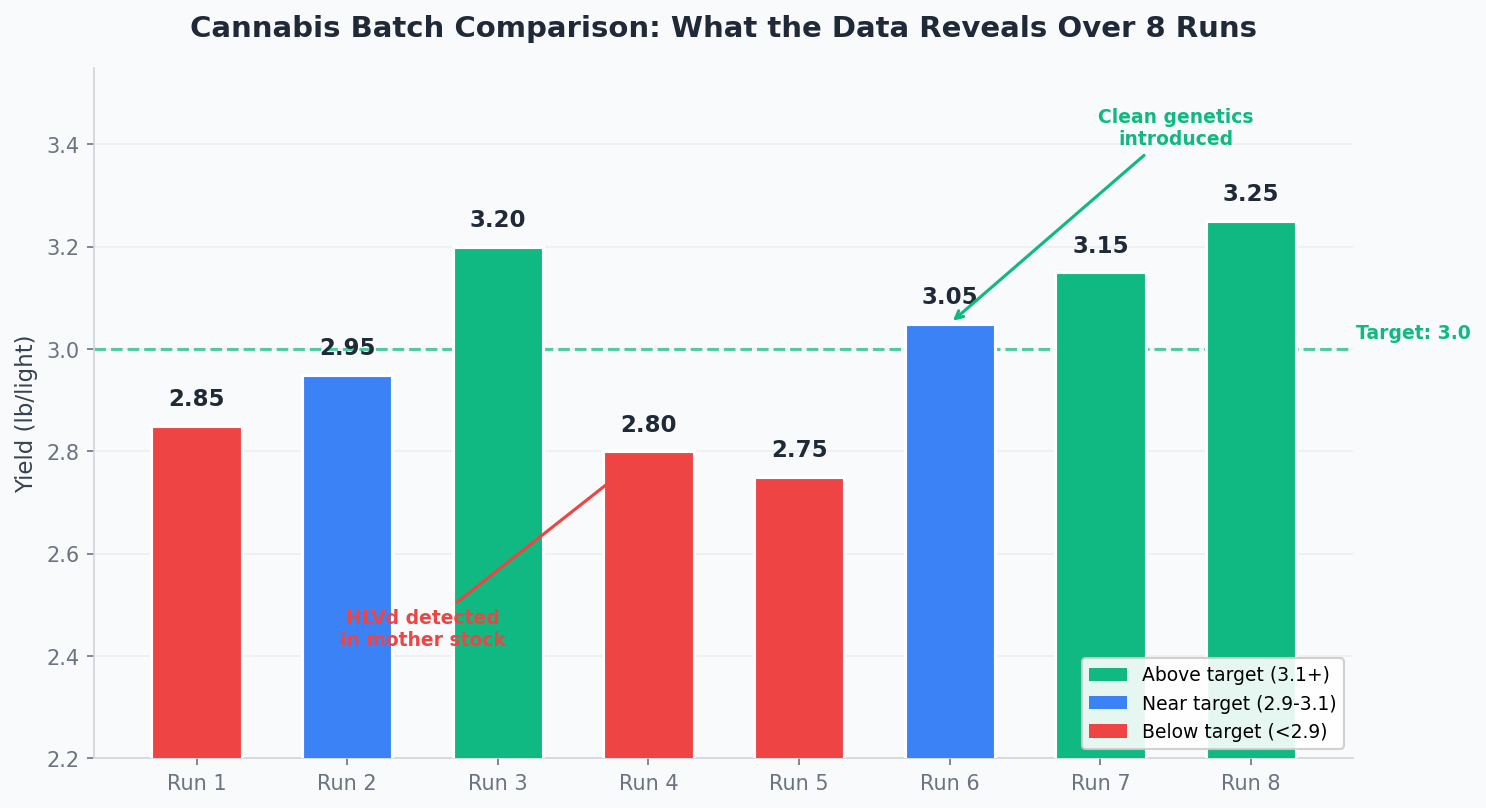
Eight runs of data reveals patterns that a single harvest never could.
The growers who figure this out are the ones who wrote things down. The patterns were there for everyone. The records are what made them visible. Without cannabis run tracking that captures the right data points, every post-harvest review is just a conversation based on memory and gut feel.
Why Spreadsheets Break Down
Let’s give spreadsheets their due. Excel or Google Sheets is a perfectly fine cannabis grow journal for your first few batches. You set up some columns, you fill them in after harvest, you scroll back to compare. It works.
It breaks when reality scales up. Multiple rooms running simultaneously with staggered flip dates. Team members entering data in different formats (did they use grams or pounds? wet or dry?). You want to compare across 10+ runs and the spreadsheet is 40 columns wide. Photos and lab result PDFs don’t fit in cells. Somebody accidentally deletes a row.
But the real cost isn’t that spreadsheets are technically bad. It’s that the friction means you stop doing it. One busy week during harvest, the batch record doesn’t get filled in. Then the next one slips too. Then you’re back to running on memory, and your yield consistency suffers because the system for improvement quietly disappeared.
This is a human behavior problem, not a technology problem. The habit of tracking has to be easier than not doing it. If entering a batch record takes 30 minutes of copying data between systems, it won’t survive contact with a busy harvest week. Period.
What AI Does to Cannabis Batch Tracking
The traditional flow looks like this: track data, stare at the data, try to find patterns yourself, maybe make a change next run. The analysis step is entirely manual. You’re the one who has to notice that weeks 5 through 7 were 2 degrees warmer than your best run, and that correlates with the THC drop. Most growers don’t have time for that level of review.
AI changes the equation by making the analysis automatic. You still track the data (yields, environment, photos, lab results, notes). But instead of manually hunting for patterns, the AI reads everything and tells you specifically what to change and why.
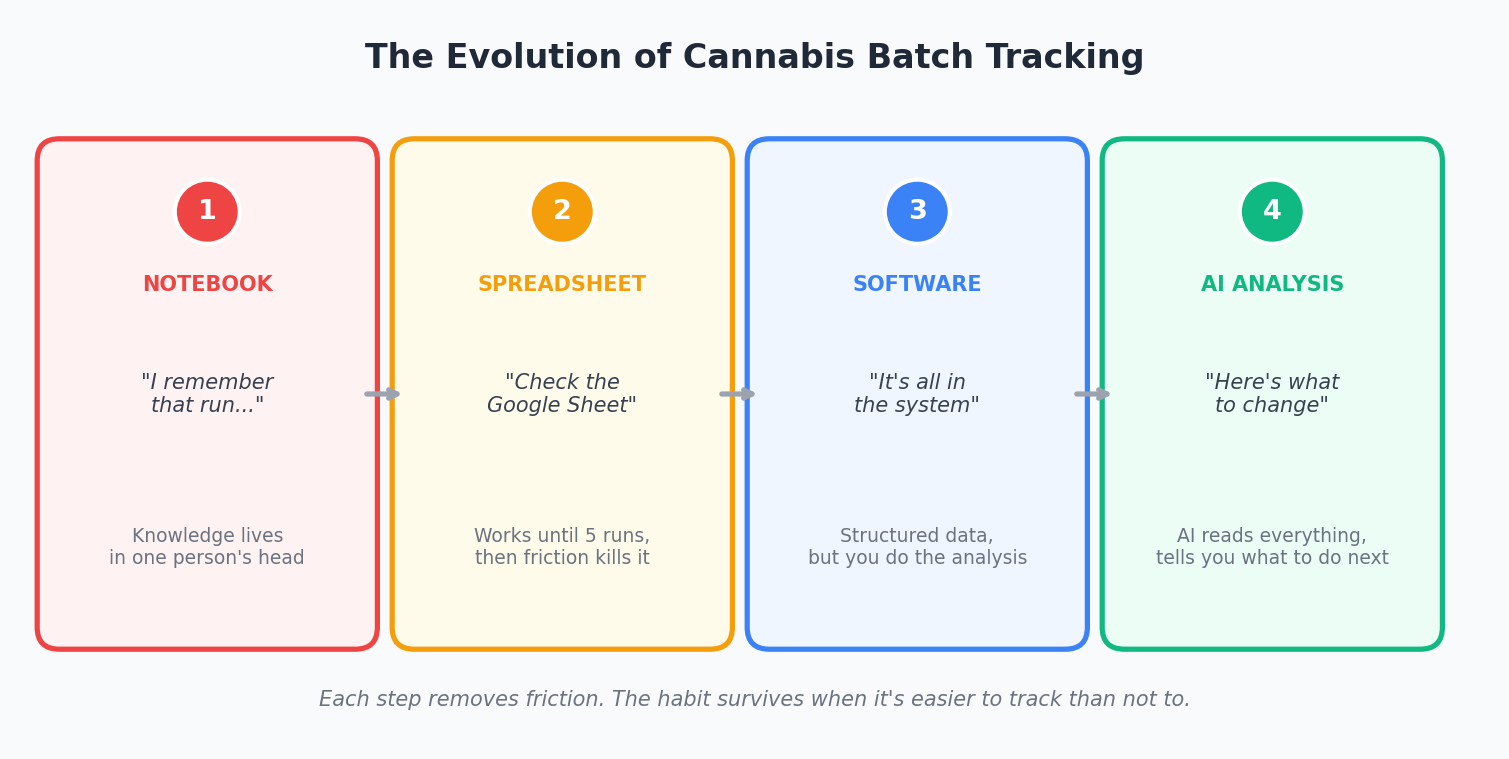
The evolution of cannabis batch tracking: each step reduces friction and adds intelligence.
Here’s what that looks like in practice with a system like Growgoyle:
Photo-based plant health assessment: Snap canopy photos from your phone at any point during the run. The AI delivers a master grower-level assessment in 60 seconds: specific targets, priority actions, and differential diagnosis that considers multiple possible causes (not just the obvious one). Those observations become part of the batch record automatically.
Post-run AI batch analysis: After every harvest, the AI reads the full batch record (environment data, photos, lab results, yield metrics, your notes) and delivers a complete breakdown. What worked. What to improve. Three specific improvement opportunities with estimated pound impact. Every run scored against your own history, not some generic industry benchmark. That’s AI batch analysis in action.
Batch comparison: Compare any two runs side by side. The AI identifies what changed between a great run and a mediocre one. “Here’s what made that 3.2 lb/light run different from the 2.8.” Your best practices get documented automatically instead of living in one person’s head.
This isn’t about replacing grower judgment. It’s about making the analysis step automatic so you can focus on execution. The AI handles the tedious part (reading through 50 data points across 8 runs to find the signal). You handle the growing.
Starting the Cannabis Batch Tracking Habit
If you’re doing nothing right now: Start with a Google Sheet. Strain, dates, yield, notes. Four columns. It’s better than nothing by a wide margin. The goal is to build the habit of recording something after every harvest.
If you’re already using spreadsheets: You’ve proven the habit exists. That’s the hard part. Now the question is whether you’re actually reviewing the data and getting value from it. If your spreadsheet is 20 runs deep and you haven’t compared the last 5 side by side, the tracking is happening but the improvement loop isn’t. Time to move to a system that does the analysis for you.
If you’re looking for dedicated cannabis grow journal software: Evaluate based on what matters. Does it make data entry fast enough that you’ll actually do it during a busy week? Does it handle photos and lab results, not just numbers? And most importantly, does it do something with the data beyond storing it? Storage is easy. Analysis is where the value lives.
The cannabis growers whose cost per pound drops consistently aren’t doing anything magical. They’re tracking what happened, reviewing what the data shows, and making specific changes based on evidence instead of memory. The tools just determine how much friction sits between “something happened” and “here’s what to do differently.”
Frequently Asked Questions: Cannabis Batch Tracking
Q: What is the difference between compliance batch tracking and cultivation batch tracking?
Compliance batch tracking (like METRC) exists to satisfy state regulatory requirements. It tracks plant counts, transfers, and harvest weights for government auditing. Cultivation batch tracking is about growing better. It captures environment data, photos, feeding details, and yield outcomes so you can analyze what worked and what did not. Compliance tells the state where your plants are. Cultivation tracking tells you how to produce more of them. You need both, but they solve fundamentally different problems.
Q: Can spreadsheets work for cannabis batch tracking?
For one or two rooms, yes, spreadsheets can work. The problem starts when you are tracking 4 or more zones across multiple batches with different strains, different flip dates, and overlapping schedules. Spreadsheet batch tracking breaks down at scale because there is no easy way to compare across batches, no photo documentation integration, and no analysis of what drove the differences. Most operations that grow beyond 2 rooms eventually hit the spreadsheet wall and start losing institutional knowledge.
Q: What data should a cannabis batch record include?
A complete batch record captures six categories: genetics (strain, source, clone/seed date), environment (daily temp, humidity, VPD, light intensity, CO2 levels), nutrition (feed recipes, EC targets, pH, runoff data), cultivation practices (topping, defoliation, training dates), harvest metrics (wet weight, dry weight, yield per light, trim ratio), and post-harvest data (lab results, dry room conditions, final quality grade). The more data you capture during the run, the more useful your post-run analysis becomes.
Q: How does AI cannabis batch analysis work?
AI batch analysis takes all the data from a completed run (environment averages, photos, yield data, grower notes, lab results) and compares it against your previous batches and known cultivation benchmarks. It identifies three things: what went well, what could improve, and the estimated pound impact of each improvement. It is not guessing. It is pattern-matching across your actual facility data over time. After 3 to 5 batches, the analysis gets sharper because it has more of your history to compare against.
Q: Do I still need batch tracking if I already use METRC?
Yes. METRC tracks what the state requires: plant counts, weights, transfers, and test results. It does not track your environment data, feeding schedules, cultivation techniques, or photos. And it has no analysis capability. METRC tells you what happened (X pounds harvested). Cultivation batch tracking tells you why it happened and how to get more next time. The two systems are complementary, not overlapping.
Right now, your batch data lives on a whiteboard, in a spreadsheet you haven’t updated since last harvest, or in your head. That works until it doesn’t. Every day you’re not logging what’s happening in your rooms is a day of data gone forever. You can’t go back and reconstruct what week 4 looked like when you’re standing in the dry room wondering why this run came up short.
Growgoyle doesn’t track your costs. It tracks your batches, analyzes your runs, and tells you exactly what to change to pull more weight. Got a room in flower right now? That’s all you need. Upload a few canopy photos and see what the AI catches in 60 seconds. Try it free on your own plants.
About the Author
Eric is a 15-year software engineer who operates a commercial cannabis cultivation facility in Michigan. He built Growgoyle to solve the problems he faces every day: inconsistent yields, forgotten lessons from past runs, and the constant pressure to lower cost per pound. Every feature in Growgoyle comes from real growing experience, not a product roadmap.
Leave a Reply